
No More API Keys: Secure Gemini Calls from Cloud Run using OAuth 2.0 and ADC
Cloud Run securely calls the Gemini API by using its service account identity to obtain short-lived OAuth 2.0 access tokens from the metadata server, eliminating the need for exposed API keys.


Secure Integration Between Cloud Run and Gemini API Using OAuth 2.0 and Application Default Credentials (ADC). The Github repos is available here.
Why this article?
Picture this: thousands of developers, hundreds of markets.
Our young team suddenly faced dozens of requests from dozens of teams — all wanting access to Gemini to power their local apps.
We knew one leaked key could break everything. So we ditched keys entirely.
Instead, we built on Google Cloud’s identity-driven foundation — no secrets, no copy-paste credentials, no friction.
Each service authenticates itself, gets a short-lived token, and moves fast. Security happens by design, not by habit.
Weeks of onboarding turned into minutes of deployment. That’s how we scaled AI access safely — and kept innovation moving.
The risks of API keys
Identity: API keys are anonymous; OAuth tokens are tied to a verified service account.
Access Control: API keys grant blanket access; OAuth uses IAM roles for precise permissions.
Lifetime: API keys never expire; OAuth tokens are short-lived and auto-rotated.
Revocation: API keys must be rotated manually; OAuth tokens are centrally revocable via IAM.
Security: API keys must be stored in code or env vars; OAuth tokens are issued securely by the metadata server.
Integration: API keys are basic; OAuth is the enterprise-grade standard across Google Cloud.
The Solution
We can securely call the Gemini API from Cloud Run without any API key by leveraging Google Cloud’s built-in identity system.
Our container has an identity (service account)
Metadata server creates a JWT assertion proving that identity
The JWT is exchanged for an access token (standard OAuth JWT Bearer flow)
We use that access token to call Gemini APIs
What are we achieving?
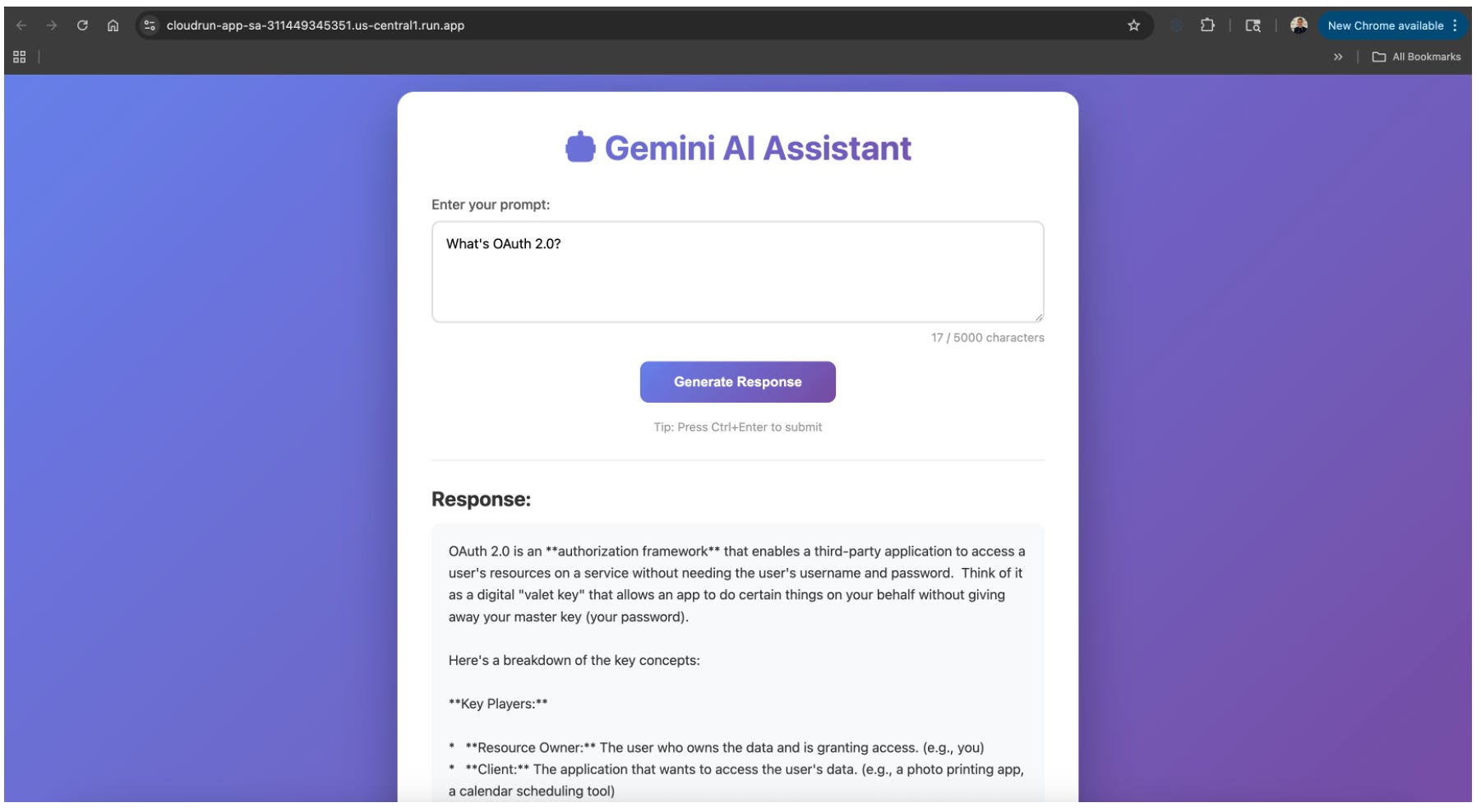
The objective
In the OAuth flow, our Python app (the client application) must present a valid Bearer JWT access token to the Gemini API (the protected resource server) to prove its identity and authorization.
The metadata server is just automating the OAuth JWKS URI with self-signed JWTs as client assertions that we’d otherwise have to do manually with service account keys. See my previous article here.
The metadata server is implementing:
JWT Bearer assertions (RFC 7523)
Client assertions for authentication (RFC 7521)
JWKS URI logic for key discovery and validation
The genius is that metadata server handles all this complexity transparently, so our app just makes a simple HTTP GET request and receives a valid access token without dealing with JWTs, signing, or key management.
The high-level flow is:
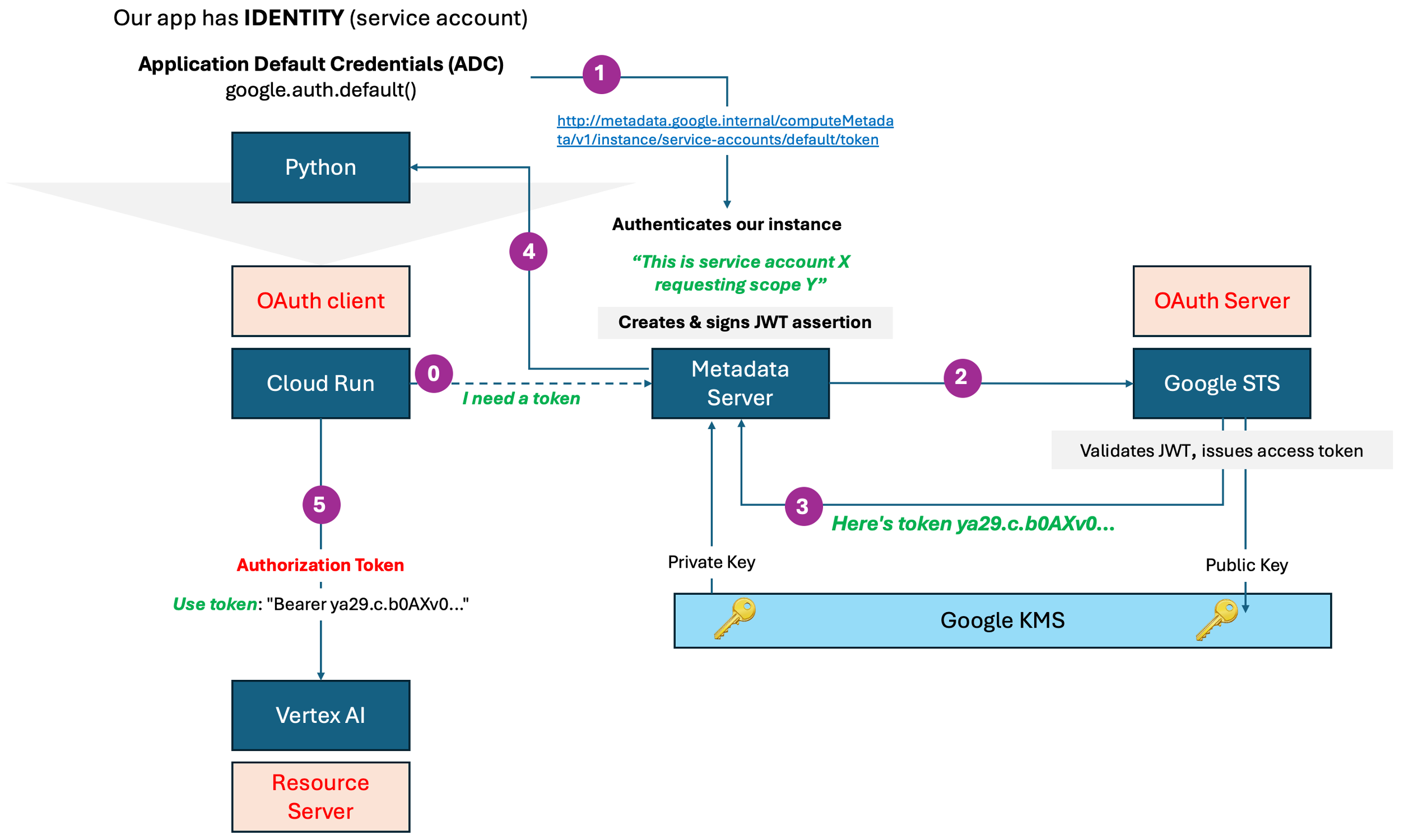
Cloud Run runs under a service account (its identity). The service account acts as the OAuth client identity.
The service account email is like
Client IDin an OAuth flow.
Our Python app requests credentials via Application Default Credentials (ADC)
Our code calls
google.auth.default()ADC detects it’s running on Cloud Run and queries the metadata server
Makes
GET http://metadata.google.internal/computeMetadata/v1/instance/service-accounts/default/tokenThe metadata server creates a JWT assertion for the service account
The metadata server is a local HTTP proxy running at 169.254.169.254 (or metadata.google.internal) that acts as a trusted intermediary between our containerized app and Google’s identity infrastructure.
Think of it as a local OAuth client agent that handles all the cryptographic operations and secret management that your application would normally need to do. See below.
Creates JWT claims containing:
iss: service account email (issuer)aud:https://oauth2.googleapis.com/token(audience)iat: issued timestampexp: expiration timestamp (typically +3600 seconds)scope: requested OAuth scopes
This JWT is then SIGNED with a private key that only Google’s infrastructure has.
The metadata server gets the JWT signed
Calls Google’s internal signing service (KMS/HSM).
The signing service signs the JWT with the service account’s private key.
The private key never exists in our container.
The metadata server exchanges the signed JWT for an access token
Makes POST request to Google STS at https://oauth2.googleapis.com/token
Uses grant type:
urn:ietf:params:oauth:grant-type:jwt-bearerSends the signed JWT as the assertion.
Google STS validates and issues an OAuth 2.0 Bearer access token
Verifies the JWT signature
Confirms the service account exists
Checks IAM permissions
Issues a standard OAuth 2.0 Bearer access token
The access token format is opaque (like
ya29.c.b0AXv0zTNx9...)
{ “access_token”: “ya29.c.b0AXv0zTNx9...”, “expires_in”: 3599, “token_type”: “Bearer” }Our app receives the token through ADC
ADC handles token refresh automatically when needed.
Our code just sees valid credentials.
Our app sends the access token to Gemini API
Includes header:
Authorization: Bearer ya29.c.b0AXv0zTNx9...Gemini API validates the token with Google’s authorization infrastructure.
Checks token validity, scopes, and IAM permissions before allowing access.
POST https://generativelanguage.googleapis.com/v1/models/gemini-pro:generateContent
Authorization: Bearer ya29.c.b0AXv0zTNx9...
{ “contents”: [{”text”: “Hello Gemini”}]
Why the Metadata Server Exists? and What would it happen without the metadata server?
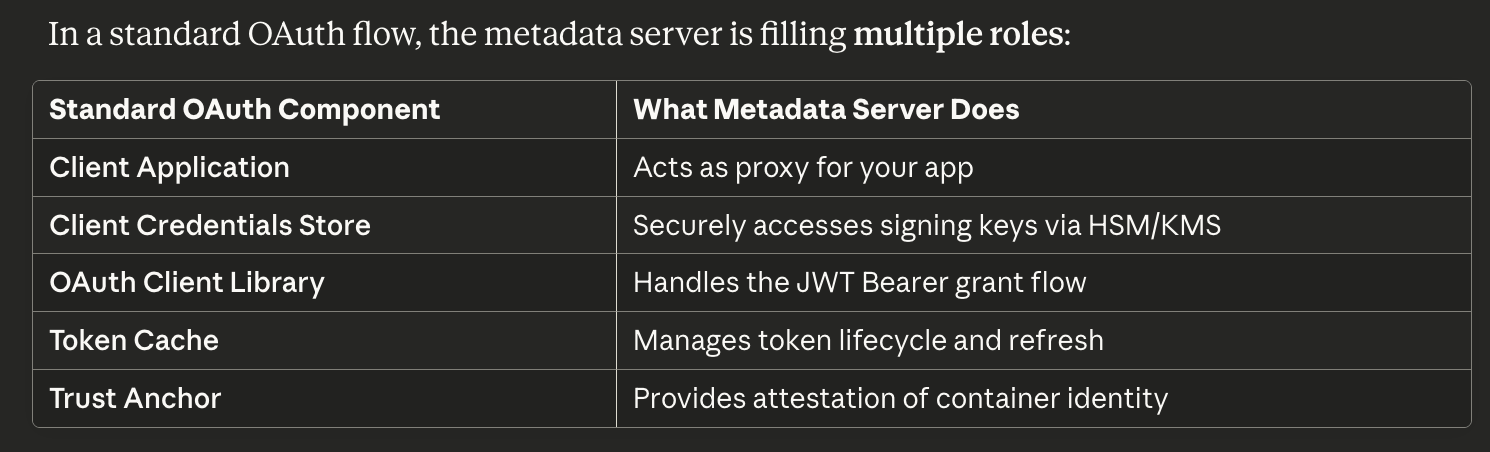
What happens when you call: creds, _ = google.auth.default()
1. ADC library checks environment
   ↓ “Am I on GCP?”

2. Discovers metadata server
   ↓ “Yes, metadata.google.internal is reachable”

3. Makes HTTP request
   GET http://metadata.google.internal/computeMetadata/v1/instance/service-accounts/default/token
   Headers: {’Metadata-Flavor’: ‘Google’}

4. Metadata server:
   a. Identifies calling container (via network namespace)
   b. Looks up bound service account
   c. Creates JWT claims:
      {
        “iss”: “gemini-caller@project.iam”,
        “aud”: “https://oauth2.googleapis.com/token”,
        “exp”: time() + 3600,
        “iat”: time(),
        “scope”: “https://www.googleapis.com/auth/cloud-platform”
      }
   d. Calls internal signing service (NOT accessible to your container)
   e. Gets signed JWT back
   f. Exchanges JWT for access token at oauth2.googleapis.com
   g. Caches token with TTL
   h. Returns to your app

5. Your app receives:
   {
     “access_token”: “ya29.c.b0AXv0zTNx9...”,
     “expires_in”: 3599,
     “token_type”: “Bearer”
   }
The metadata server does ALL of this for us, but:
Without storing keys in your container
Using Google’s internal signing infrastructure
Automatically refreshing when needed
Otherwise - we should:
# 1. Load service account key (security risk!)
with open(’service-account-key.json’) as f:
    key_data = json.load(f)

# 2. Create JWT assertion manually
claim_set = {
    “iss”: key_data[”client_email”],
    “scope”: “https://www.googleapis.com/auth/cloud-platform”,
    “aud”: “https://oauth2.googleapis.com/token”,
    “exp”: int(time.time()) + 3600,
    “iat”: int(time.time())
}

# 3. Sign it with private key
signed_jwt = jwt.encode(
    claim_set,
    key_data[”private_key”],
    algorithm=”RS256”
)

# 4. Exchange for token
response = requests.post(
    “https://oauth2.googleapis.com/token”,
    data={
        “grant_type”: “urn:ietf:params:oauth:grant-type:jwt-bearer”,
        “assertion”: signed_jwt
    }
)

access_token = response.json()[”access_token”]

#5. Token Caching and Lifecycle Management
token_cache = {
    “token”: “ya29.c.b0AXv0zTNx9...”,
    “expires_at”: 1703004834,
    “scopes”: [”https://www.googleapis.com/auth/cloud-platform”]
}

# When you request a token:
if current_time < expires_at - 60:  # 60 second buffer
    return cached_token
else:
    new_token = perform_oauth_exchange()
    update_cache(new_token)
    return new_token
A - Identity Attestation (Most Critical Function)
Our container says: “Give me a token”
                           ↓
Metadata server asks itself: “Who is making this request?”
                           ↓
It knows because: The request comes from localhost
                  AND it has kernel-level proof of which
                  container/process is asking
                           ↓
“This is definitely the Cloud Run service ‘myapp’
 running under service account ‘gemini-caller@project.iam’”
Technical implementation:
Uses Linux namespaces and cgroups to identify the calling process
Verifies the request comes from the expected container runtime
Cannot be spoofed from outside the container
B - Cryptographic Signing (The Secret Sauce)
# What our app WOULD need to do without metadata server:
private_key = load_private_key_from_file(”key.json”)  # DANGEROUS!
jwt_assertion = jwt.encode(claims, private_key, algorithm=”RS256”)

# What metadata server does FOR you:
# 1. It has access to a signing service (no key file!)
# 2. Creates the JWT assertion
# 3. Gets it signed by Google’s internal HSM/KMS
# 4. Never exposes the private key to our container
```

**The actual signing happens like this:**
```
Metadata Server → Google’s Internal Signing Service
“Please sign this JWT for service account X”
                    ↓
Signing Service (HSM/KMS backed):
“I verify you’re the legitimate metadata server for container Y,
 here’s the signed JWT: eyJhbGciOiJSUzI1NiIs...”
C - Token Exchange Orchestration
The metadata server makes the actual OAuth call that your app would otherwise make:
POST https://oauth2.googleapis.com/token HTTP/1.1
Content-Type: application/x-www-form-urlencoded

grant_type=urn:ietf:params:oauth:grant-type:jwt-bearer
&assertion=eyJhbGciOiJSUzI1NiIs[...signed JWT...]
It handles on our behalf:
Network retries
Error handling
Token refresh timing
Caching (so multiple requests don’t create multiple tokens)
D - Token Caching and Lifecycle Management
# What it manages internally:
token_cache = {
    “token”: “ya29.c.b0AXv0zTNx9...”,
    “expires_at”: 1703004834,
    “scopes”: [”https://www.googleapis.com/auth/cloud-platform”]
}

# When you request a token:
if current_time < expires_at - 60:  # 60 second buffer
    return cached_token
else:
    new_token = perform_oauth_exchange()
    update_cache(new_token)
    return new_token
Can we say that Metadata server is applying JWTs, Client Assertions & JWKS URI logic?
Yes! The metadata server is implementing the OAuth 2.0 JWT Bearer assertion flow with client authentication.
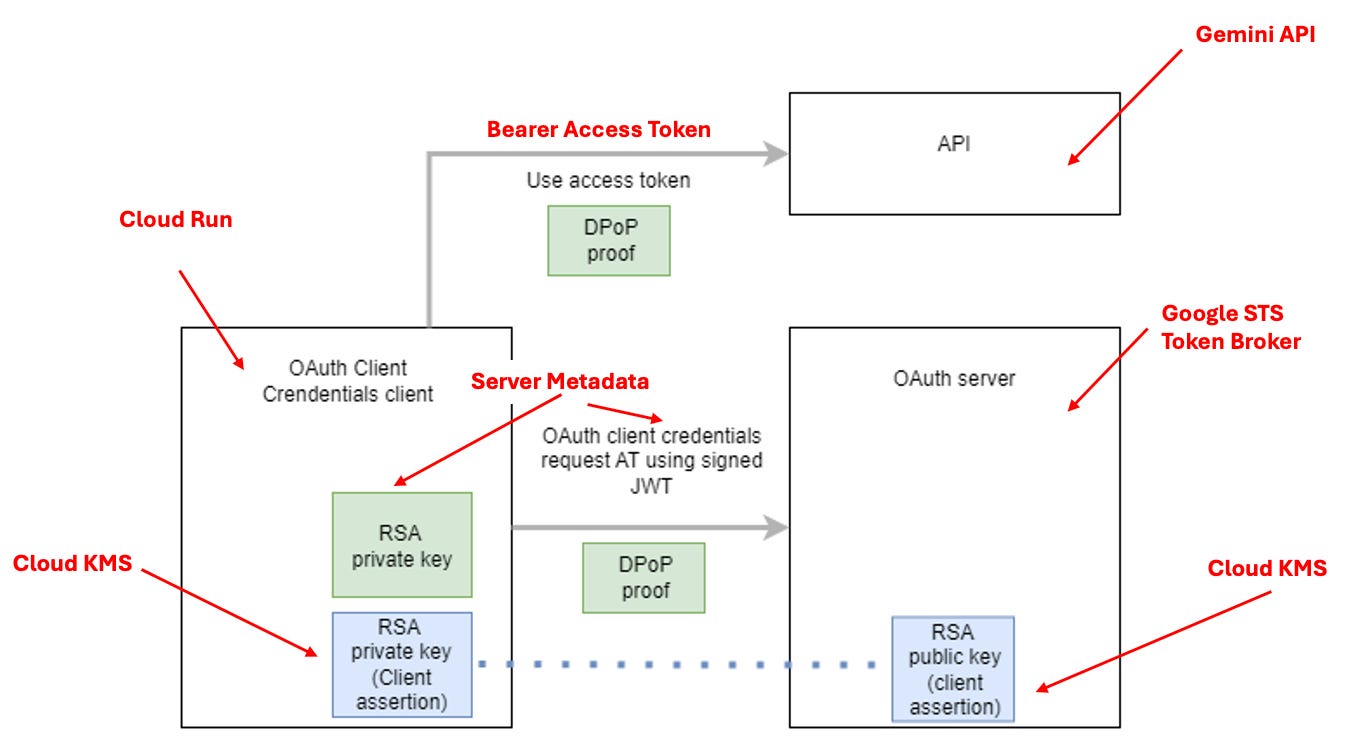
To refresh your mind on how Client Assertion powered by JWTS works - See my previous article here
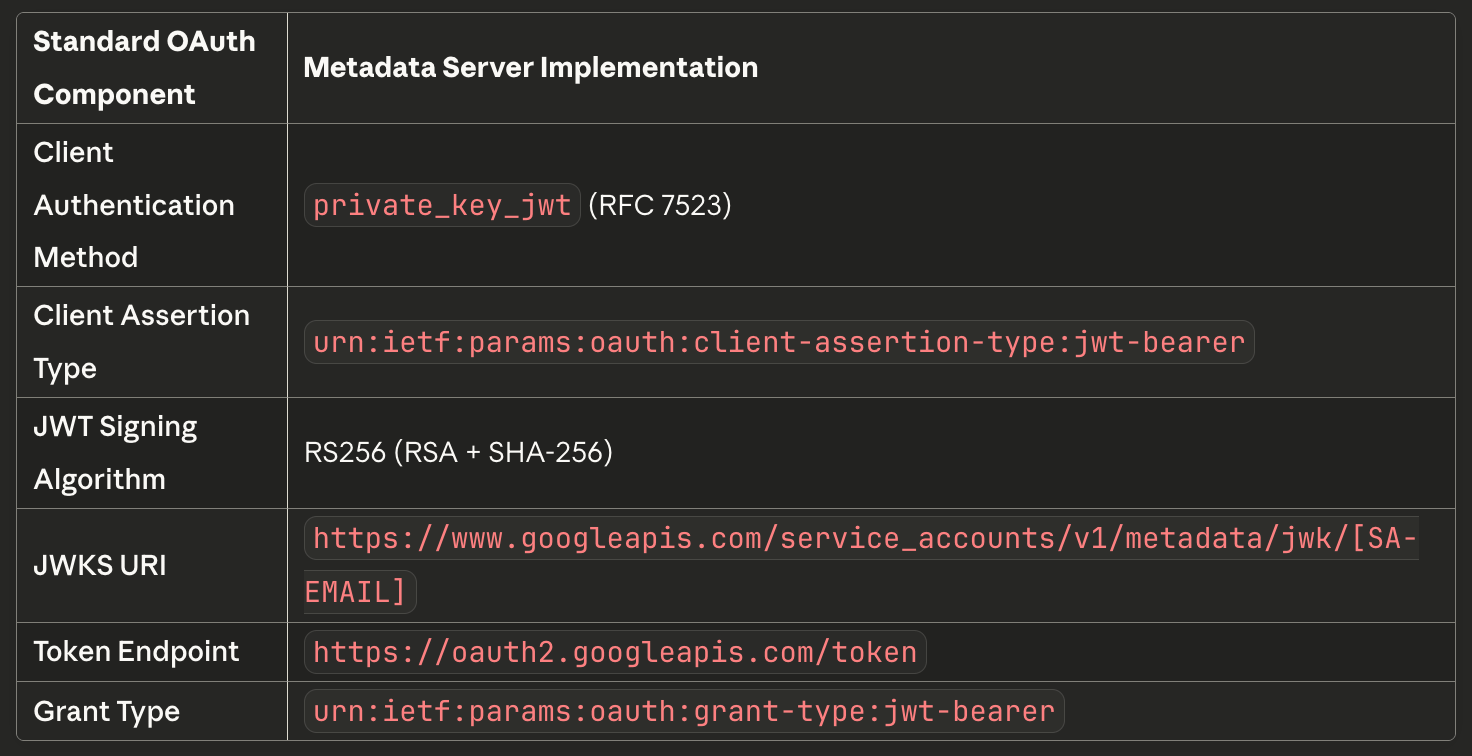
JWT Client Assertion Flow
The metadata server implements JWT client assertions:
POST https://oauth2.googleapis.com/token
Content-Type: application/x-www-form-urlencoded

grant_type=urn:ietf:params:oauth:grant-type:jwt-bearer
&assertion=eyJhbGciOiJSUzI1NiIsInR5cCI6IkpXVCJ9...[signed JWT]
The JWT assertion serves as both:
Client authentication (proves who the service account is)
Grant authorization (requests token on behalf of that service account)
The validation flow:
STS receives the signed JWT assertion
Extracts the
kid(key ID) from JWT headerFetches public keys from JWKS URI
Validates signature using the matching public key
Issues access token if valid
Google uses JWKS (JSON Web Key Set) for validation:
Service Account Public Keys are available at:
https://www.googleapis.com/service_accounts/v1/metadata/x509/[SERVICE-ACCOUNT-EMAIL]

Or as JWKS:
https://www.googleapis.com/service_accounts/v1/metadata/jwk/[SERVICE-ACCOUNT-EMAIL]
Application Default Credentials (ADC)
Application Default Credentials (ADC) is a Google authentication mechanism that automatically finds the right credentials for your application to call Google APIs without you having to manage keys manually.
It’s part of the google-auth library used in Python and other Google Cloud SDKs.
In simple terms:
ADC automatically figures out who your app is and how it should authenticate when accessing Google Cloud services.
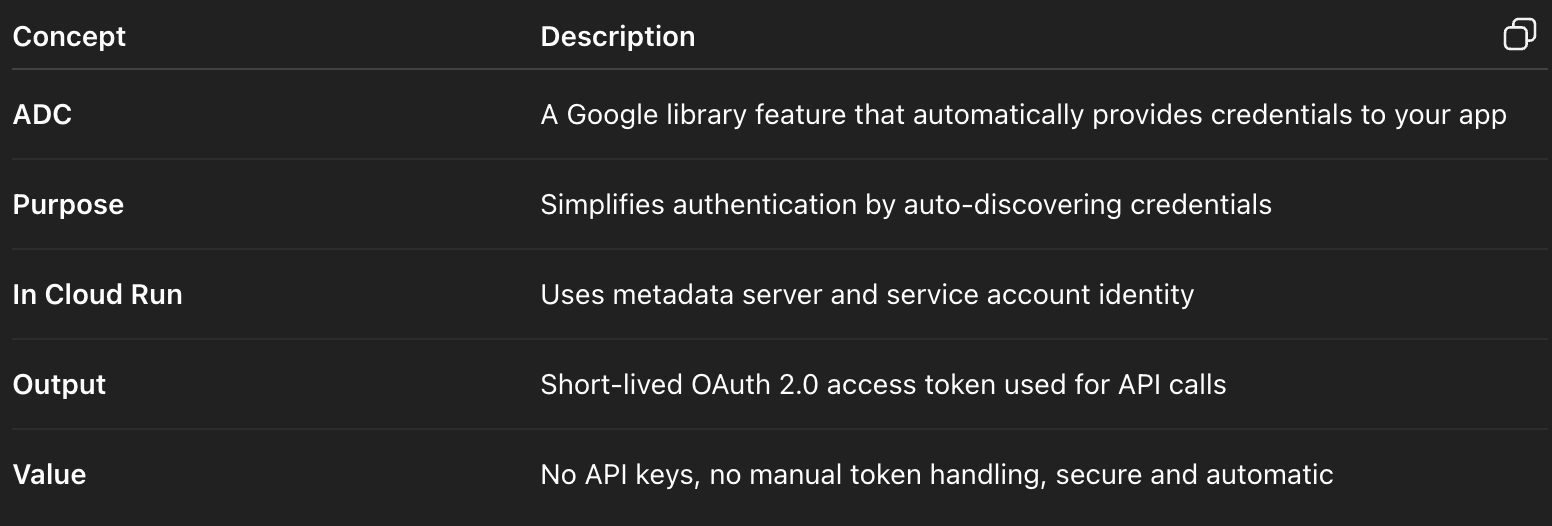
The main goal of ADC is to simplify and secure authentication.
It removes the need for you to hardcode, download, or configure credentials manually.
When you call:
from google.auth import default
creds, project = default()
ADC searches for credentials in a specific order until it finds valid ones.
How ADC Works (Search Order) - follows this order:
Environment Variable
If the environment variableGOOGLE_APPLICATION_CREDENTIALSis set and points to a service account key file, ADC uses that file.Google Cloud Runtime Environment
If no key file is found but the app is running on Cloud Run, GKE, Compute Engine, or Cloud Functions,
ADC automatically uses the metadata server to get short-lived credentials for the attached service account.User Credentials (local development)
If you’re running locally and you’ve authenticated withgcloud auth application-default login, ADC uses those credentials.
Conclusion
No secret stored in our code or environment variables.
Cloud Run’s service account identity handles auth via metadata server.
Tokens are short-lived and automatically rotated.
We can control access tightly with IAM (only certain services can call Gemini).
Optional Hardening
If you want to be even stricter:
Enable “Require authentication” on your Cloud Run service (so only authorized callers can hit your endpoint).
Use VPC egress + Private Service Access if you want all API calls to stay within Google’s internal network.
Use Workload Identity Federation if calling Gemini from outside GCP (e.g. GitHub Actions).