
Stress-Testing an OIDC Flow Before Production — My Tech Lead’s Framework
... or How to Hack an App having a Malformed OIDC flow?


As a tech lead, a big part of my job is to review an application and formally commit—on behalf of my team—that it is secure enough to ship. In my company, most applications rely on OAuth 2.0 and OpenID Connect (OIDC). When I sign off on an application, I am effectively taking responsibility for the security of its authentication and authorization flow.
This post documents the framework I use to pentest and stress-test an OAuth/OIDC flow before production.
The objective is not to re-implement the spec—it is to prove that the implementation is resilient under realistic attack conditions.
The approach is practical:
Intercept everything with mitmproxy
Analyze and correlate flows with Python
Run it all in Docker for repeatability
Produce evidence,
not opinions
Problem Framing: Where OAuth Security Fails in Practice
Most security failures do not originate from the specification—they originate from misuse, misconfiguration, or incomplete threat modeling.
Typical failure points:
Tokens exposed outside their intended boundaries
Authorization codes reused or intercepted
Weak redirect URI validation
Missing PKCE or state validation
Tokens stored or logged insecurely
Frontend compromise (XSS)
Over-trusting TLS as a security boundary - TLS protects transport, not behavior.
Common Attacks to Simulate
Authorization code reuse
PKCE removal
Redirect URI manipulation
Token leakage via referers
CSRF via missing or reusable state
Refresh token replay
What I Am Actively Exploring?
The core question this framework answers is:
If I fully intercept and reconstruct the OAuth/OIDC flow, is there any data exposed, misplaced, reusable, or insufficiently protected?
To answer that, I:
Capture the entire authorization lifecycle
Reconstruct flows step-by-step
Analyze tokens, headers, cookies, parameters, and redirects
Simulate realistic attacks
Threat Model -Baseline
Before testing, let’s define the attacker:
Network attacker (same Wi-Fi, corporate proxy)
Malicious browser extension
Compromised frontend (XSS)
Stolen refresh token
Misconfigured OAuth client
Assumptions:
TLS is enabled
Identity Provider (IdP) is trusted but not infallible
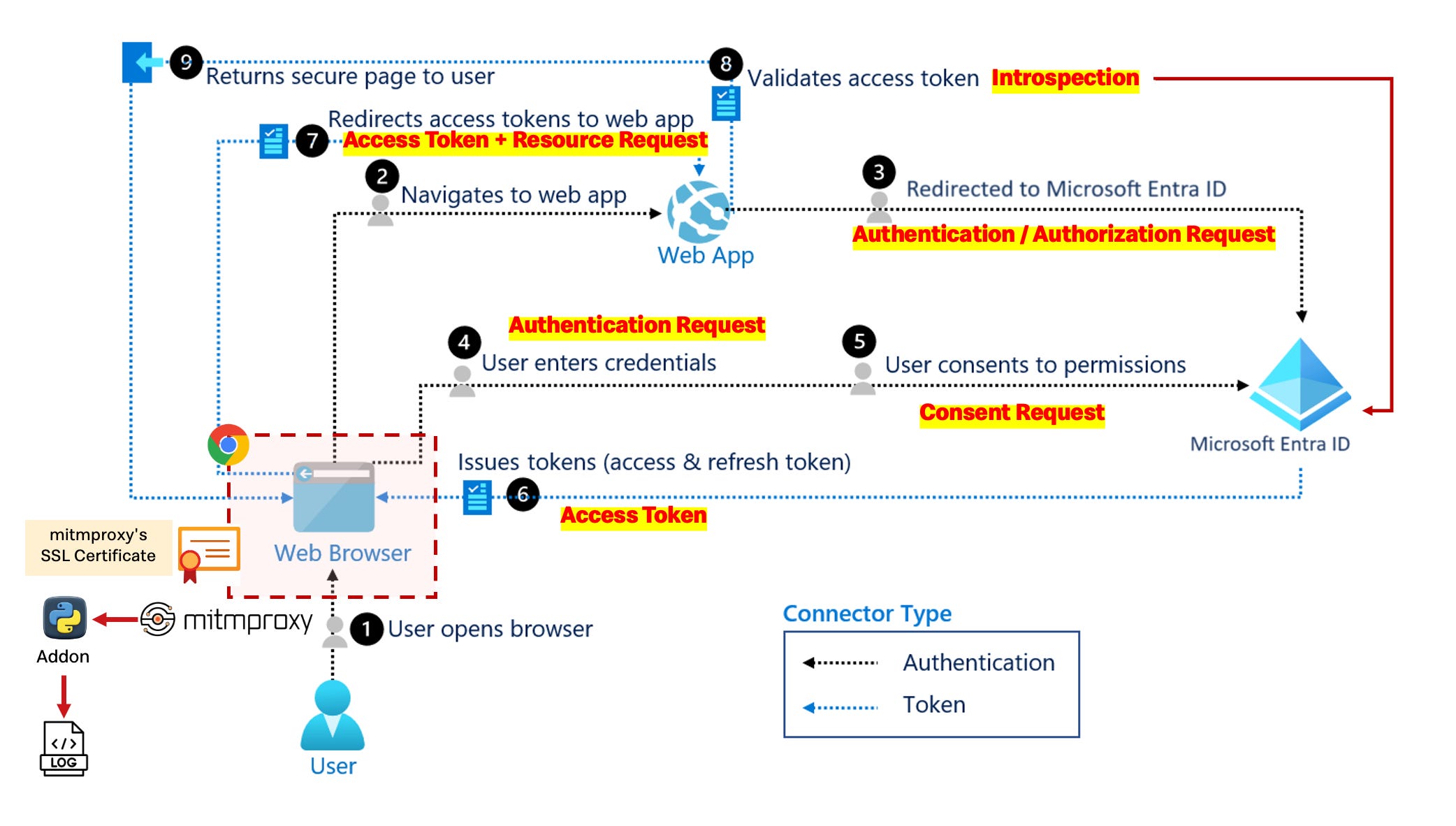
Authorization Request
The client initiates authorization at the IdP.
Is PKCE (
code_challenge) used for public clients?Is
statepresent and validated?Are
response_typeandscopeappropriate?Is
redirect_uristrictly validated?
Ideal Situation
PKCE enforced (
S256)Unique
state, validated server-sideresponse_type=codeMinimal scopes
Redirect URIs are exact-match only
User Authentication
The IdP authenticates the user.
Are strong authentication policies enforced?
Is IdP session separation clear?
Ideal Situation
MFA where required
Short-lived IdP sessions
Authorization Response
The IdP redirects the user back with an authorization code or error.
Is
statevalidated before processing?Are authorization codes single-use and short-lived?
Are errors handled safely?
Ideal Situation
Single-use, short-lived authorization codes
Mandatory state validation
No sensitive data in redirects or logs
Token Exchange
The client exchanges the authorization code for tokens.
Is the exchange done over HTTPS?
Are tokens ever exposed in URLs?
Is
code_verifierrequired for PKCE?
Ideal Situation
HTTPS enforced
Tokens only returned in secure response bodies
PKCE verification mandatory
Client secrets never exposed to frontend
Token Storage
Where issued tokens are stored after exchange.
Where are access tokens stored?
Where are refresh tokens stored?
Are cookies properly configured?
Ideal Situation
Access tokens: short-lived, memory or HttpOnly cookies
Refresh tokens: server-side or HttpOnly cookies
No tokens in
localStorageCookies:
HttpOnly,Secure, intentionalSameSite
Token Usage
Access tokens are used to call protected APIs.
Are tokens sent via Authorization headers?
Is validation done server-side?
Are scopes enforced per endpoint?
Ideal Situation
Authorization: Bearer <token>onlyServer-side validation (signature, issuer, audience, exp)
Scope checks on every protected endpoint
Refresh Flow
Refreshing access tokens without user interaction.
Are refresh tokens rotated?
Is reuse detected?
Ideal Situation
Refresh token rotation enabled
Reuse detection and revocation
Limited refresh token lifetime
Logout / Revocation
Termination of trust and session cleanup.
Are tokens revoked?
Are sessions fully invalidated?
Ideal Situation
Server-side session invalidation
Token revocation at IdP
Logout propagated when supported
What to Capture?
For every request and response:
URL
Method
Headers
Cookies (
Set-CookieandCookie)Query parameters
POST bodies
Redirect chains
Special attention to:
/authorize/token/callback/userinfo/.well-known/openid-configuration
If it crosses the wire, it is captured.
My framework and evidence I Require for Sign-Off
When Chrome makes requests, they go through mitmproxy first. Our Python script acts as a mitmproxy “addon” that intercepts these requests/responses and logs them.
Chrome → mitmproxy (proxy:8080) → Internet
            ↓
    Python addon (your script)
            ↓
    traffic_log.txt
1 - Interception Layer (mitmproxy)
Acts as an HTTP/HTTPS proxy server that sits between Chrome and the internet. Chrome is configured to route all traffic through mitmproxy
Capture all HTTP/HTTPS traffic
Log OAuth endpoints and API calls
Extract OAuth parameters from URLs and bodies
2 - Analysis Engine (Python)
Starts mitmproxy programmatically, captures traffic events, and logs them
Parse captured traffic
Reconstruct OAuth flows
Validate PKCE, state, token handling
Flag security findings
3 - Containerized Test Environment (Docker)
Isolated and reproducible
CI/CD friendlyEasy to share and rerun
To approve a release, I require:
Full intercepted flow logs
Decoded token samples
Cookie tables
Scope-to-endpoint mapping
Screenshots of redirects
mitmproxy scripts
How to Set up my pentesting pipeline?
A - Install mitmproxy in our MacOS
brew install --cask mitmproxy
mitmdump --version
B - Create our Analysis Engine with python
mkdir Desktop/HandsOn/MITM-PROXY
python3 -m venv venv-mitmp
source venv-mitmp/bin/activate
pip install mitmproxy
Now let’s create our Python script. The file chrome_traffic_log.txt will be the output destination where all captured traffic is logged.
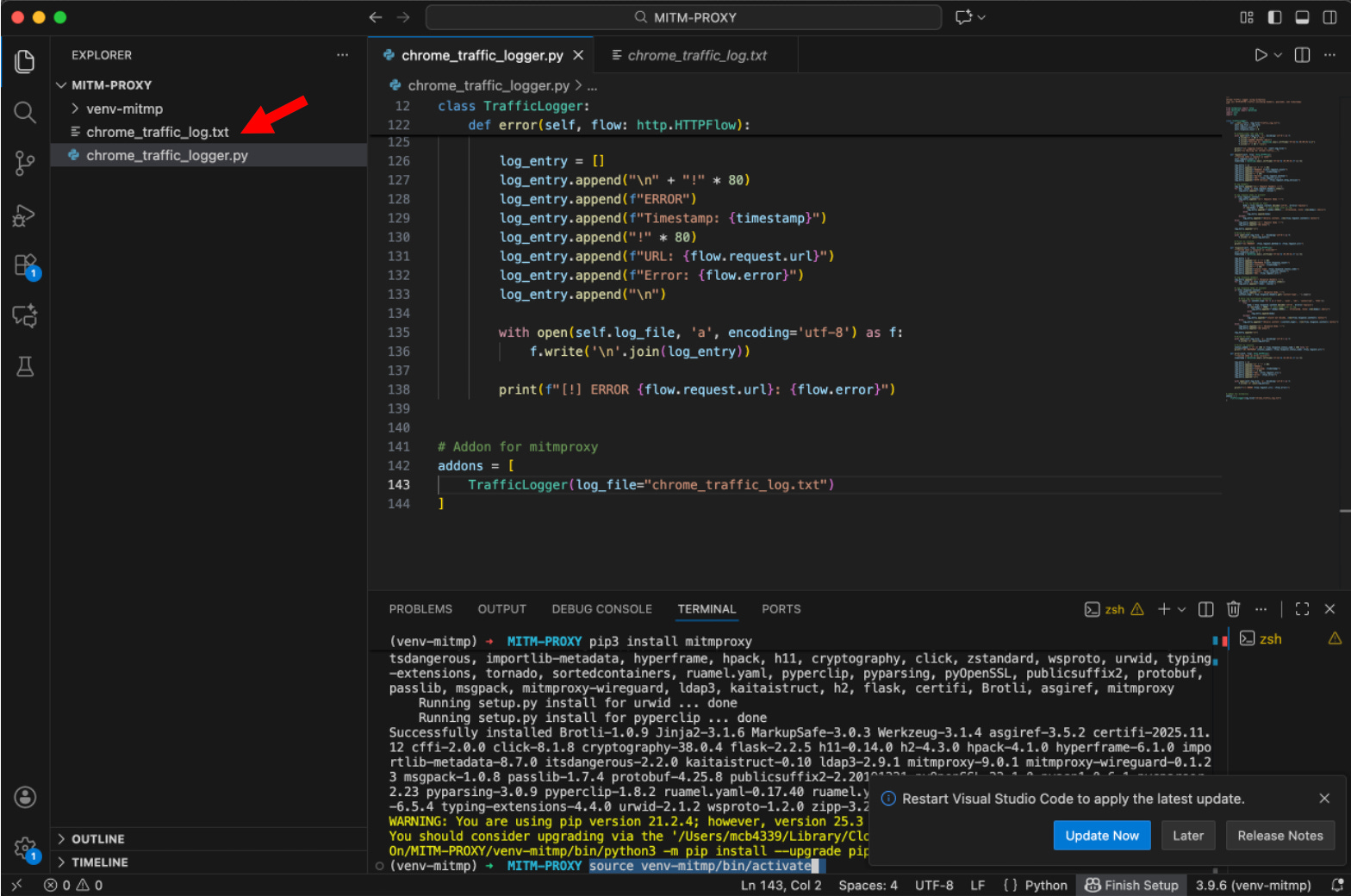
C - Launch mitmproxy
In one Terminal - let’s launch:
cd Desktop/HandsOn/MITM-PROXY
mitmdump --ssl-insecure -s chrome_traffic_logger.py
In another Terminal - let’s launch:
/Applications/Google\ Chrome.app/Contents/MacOS/Google\ Chrome \ --proxy-server="http://localhost:8080" \ --user-data-dir="/tmp/chrome-proxy-profile"First - be sure that we:
Start
mitmproxyonce in a terminal and then……Visit
http://mitm.it inChrome and then……Download and install the certificate for our OS
Without this certificate, Chrome will show SSL errors for all HTTPS sites.
Install certificate into macOS Keychain
Open Keychain Access
Import:
~/.mitmproxy/mitmproxy-ca-cert.pemFind the certificate
Open it → Trust
Set:
When using this certificate → Always Trust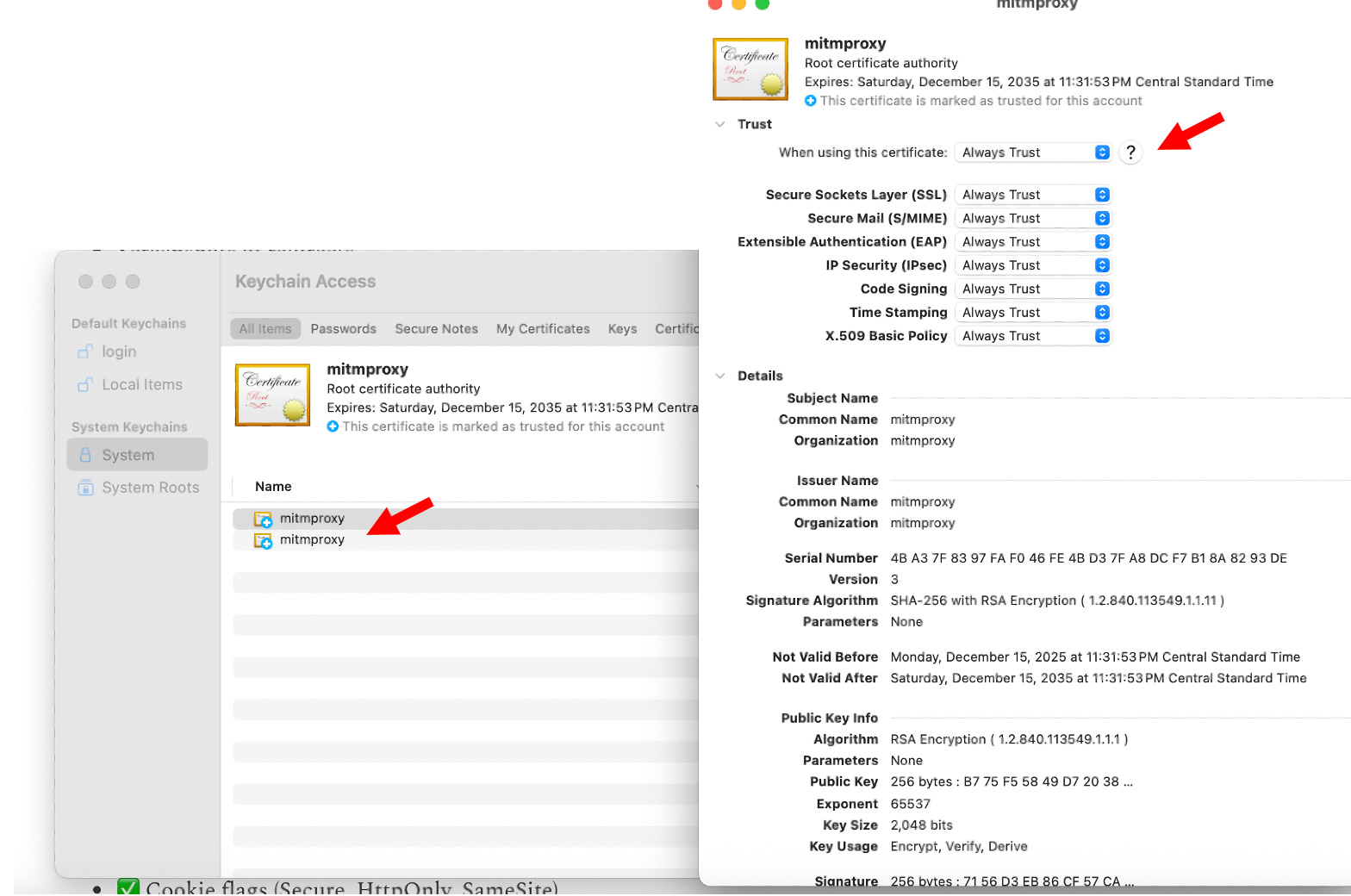
Conclusion
✅ PKCE presence and strength (S256 vs plain)
✅ State parameter for CSRF protection
✅ Nonce for replay protection
✅ Redirect URI security (HTTPS enforcement)
✅ Token transmission methods (never in URLs)
✅ JWT algorithm validation (no “none” algorithm)
✅ Token expiration validation
✅ Cookie flags (Secure, HttpOnly, SameSite)
Bibliography
https://www.rapidseedbox.com/blog/mitmproxy
https://saraford.net/2017/08/31/how-to-use-httpsjwt-ms-to-decode-json-web-tokens/
https://saraford.net/2017/08/31/how-to-use-httpsjwt-ms-to-decode-json-web-tokens/