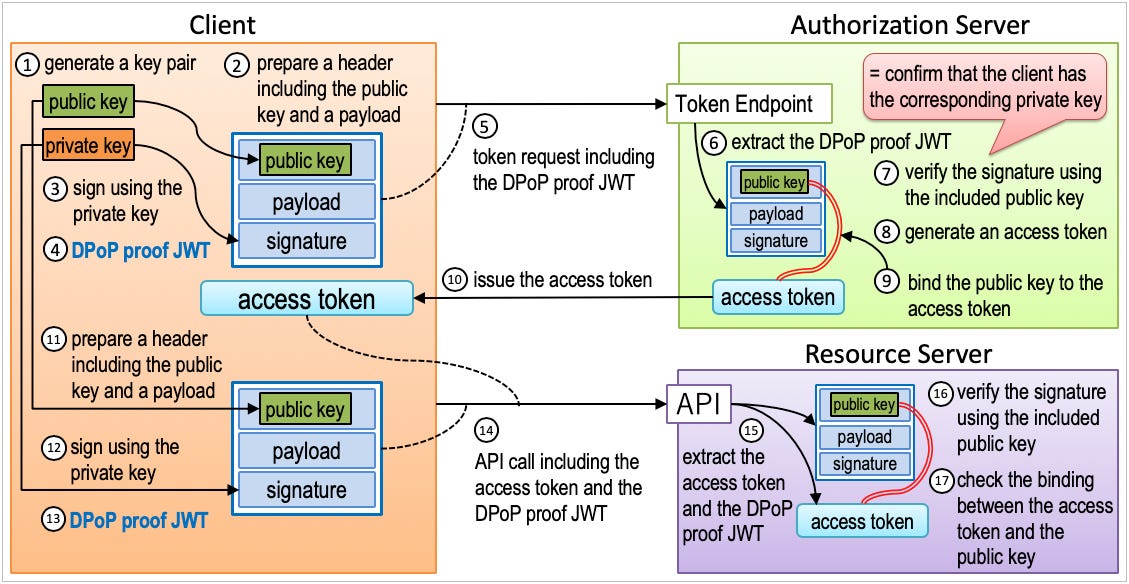
Unlocking Secure Machine Identity: Mastering JWTs, Client Assertions & JWKS URI
JWT-based machine authentication enables services to verify machine identities using self-signed JWTs as client assertions, validated through a JWKS URI that exposes public keys for signature verif.


Modern systems are full of machines talking to other machines: microservices, background jobs, automation tools, data pipelines, and cloud workloads. All of them must prove who they are when calling protected APIs.
Traditionally this is done with client secrets, but secrets do not scale, are hard to rotate, and become security liabilities.
A better method is machine identity using asymmetric cryptography:
The client holds a private key that never leaves the machine.
It authenticates by signing a self-issued JWT (a client assertion).
The identity provider validates this JWT using the client’s public key, distributed securely through a JWKS URI.
This eliminates shared secrets, greatly improves security, and supports scalable architectures.
Why JWT-based Machine Authentication Matters?
1. No shared secrets
Secrets leak. Private keys stay on the machine and never move.
2. Automatic key rotation
Clients can rotate their private keys at any time, publishing new public keys through the JWKS endpoint—without opening a ticket or touching Azure.
3. Clear trust boundaries
The IdP trusts only what is signed by the private key matching a public key in the JWKS URI.
Your API trusts only what is signed by Azure.
4. Scales for cloud environments
Static registration for every single client instance becomes unmanageable.
JWT + JWKS is a foundation for dynamic client registration (DCR) in future.
Client Assertion
Client assertion is an authentication method where a client proves its identity to an authorization server using a self-signed JWT instead of a client secret. The client cryptographically signs a JWT with its private key; the server validates it using the corresponding public key.
An assertion is a collection of information for sharing identity and security information across security domains.
Normally assertions include a subject (who the assertion relates to), the issuer (who stamps their approval of the subject) and the context of when it’s valid (where and when it can be used).
Let’s note that every client instance must be registered manually - into the IdP - which becomes unmanageable as the number of clients grows. This registration is a static, manual process - fine for monoliths - but ill-suited for dynamic environments where services spin up, scale down, or self-replicate constantly. That’s where Dynamic Client Registration (DCR) could enter the picture (it’s not the purpose of this article).
Here we will describe Client Assertions and the JWKS URI technics - which use JSON Web Tokens (JWT) to authenticate a client, via message level security. Here it will be combined with a JWKS URI mechanism for validating received client assertions.
Note you can also register manually in the IdP (Upload Public Key Directly into Azure - see below).
What are we trying to achieve here?
We will implement a Python client application (running locally or on a server) that securely calls a resource server to transform input text into uppercase. Authentication is handled through Azure Entra ID using JWTs, leveraging asymmetric cryptography (public/private key pairs) instead of a shared secret.
Client has a private key (never shared)
Client publishes a public key via JWKS endpoint
Azure Entra ID fetches the public key to verify the client’s identity
Client can rotate keys independently without coordinating with Azure
👉 In this tutorial, we’ll implement JWT authZ with JWKS endpoint.
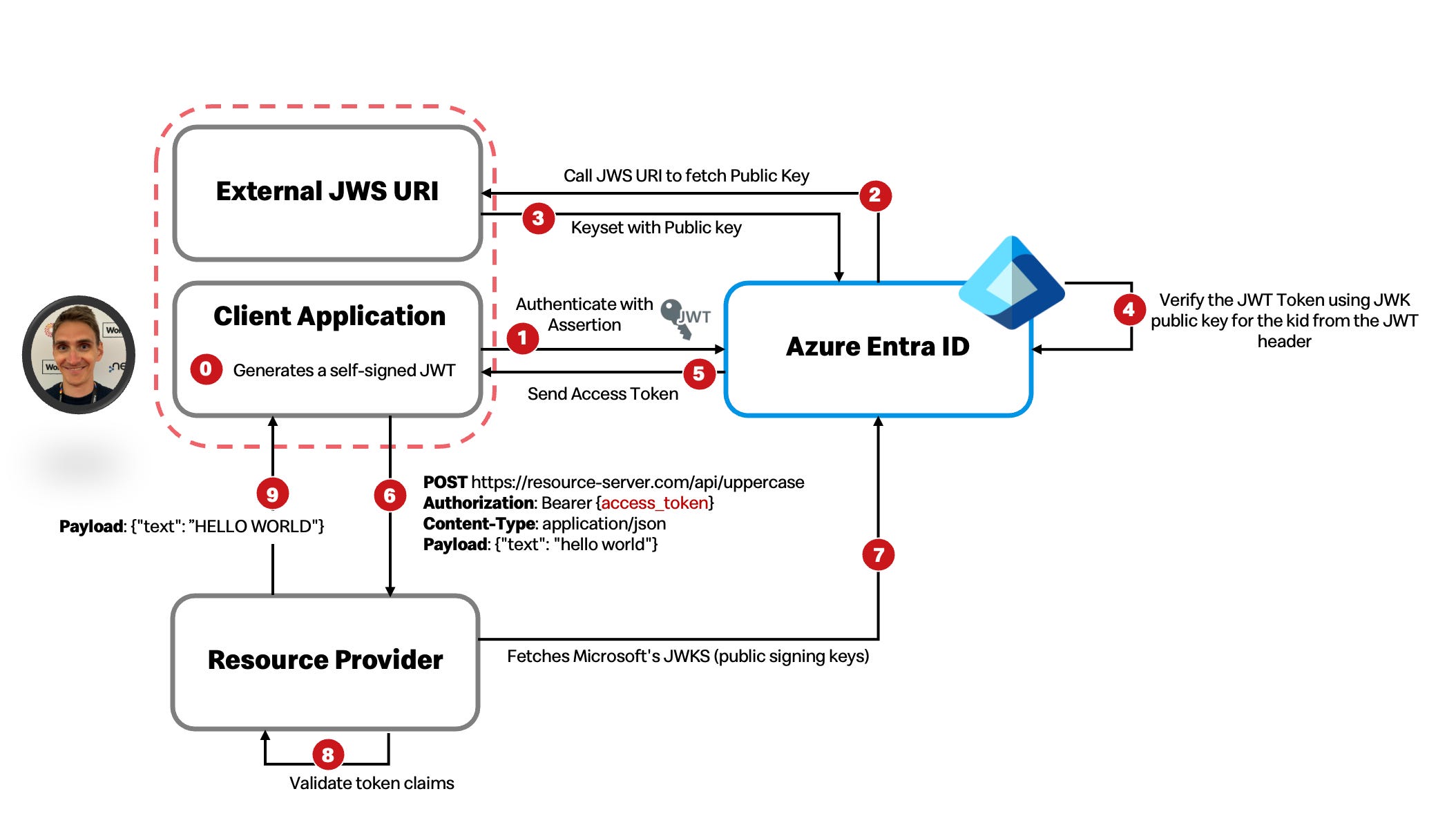
Our Client Application and Resource Provider trust Azure Entra ID (Microsoft’s identity provider). We register our client app and resource provider with Azure
We can either upload our public key/certificate to Azure
Or expose our JWKS endpoint
Azure verifies our client assertion using our public key
Azure issues an access token signed with Azure’s key
Our resource server trusts tokens signed by Azure
Resource server fetches Azure’s public keys to verify tokens
If signature valid + claims valid → access granted
At a crossroads of choices
Two Registration Methods
Method 1: Upload Public Key Directly into Azure
Customer generates key pair
Customer sends you the public key (PEM, JWK format)
You manually register it in IdP against their client_id
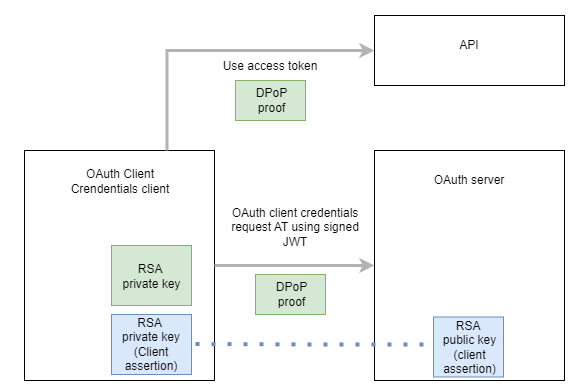
Method 2: Create a JWKS URL Endpoint and register it into Azure
Customer hosts their own JWKS endpoint (e.g.,
https://customer.com/.well-known/jwks.json)You register the URL in IdP
IdP dynamically fetches public key when validating JWT
Enables customer to rotate keys independently
The story flow - How to implement it?
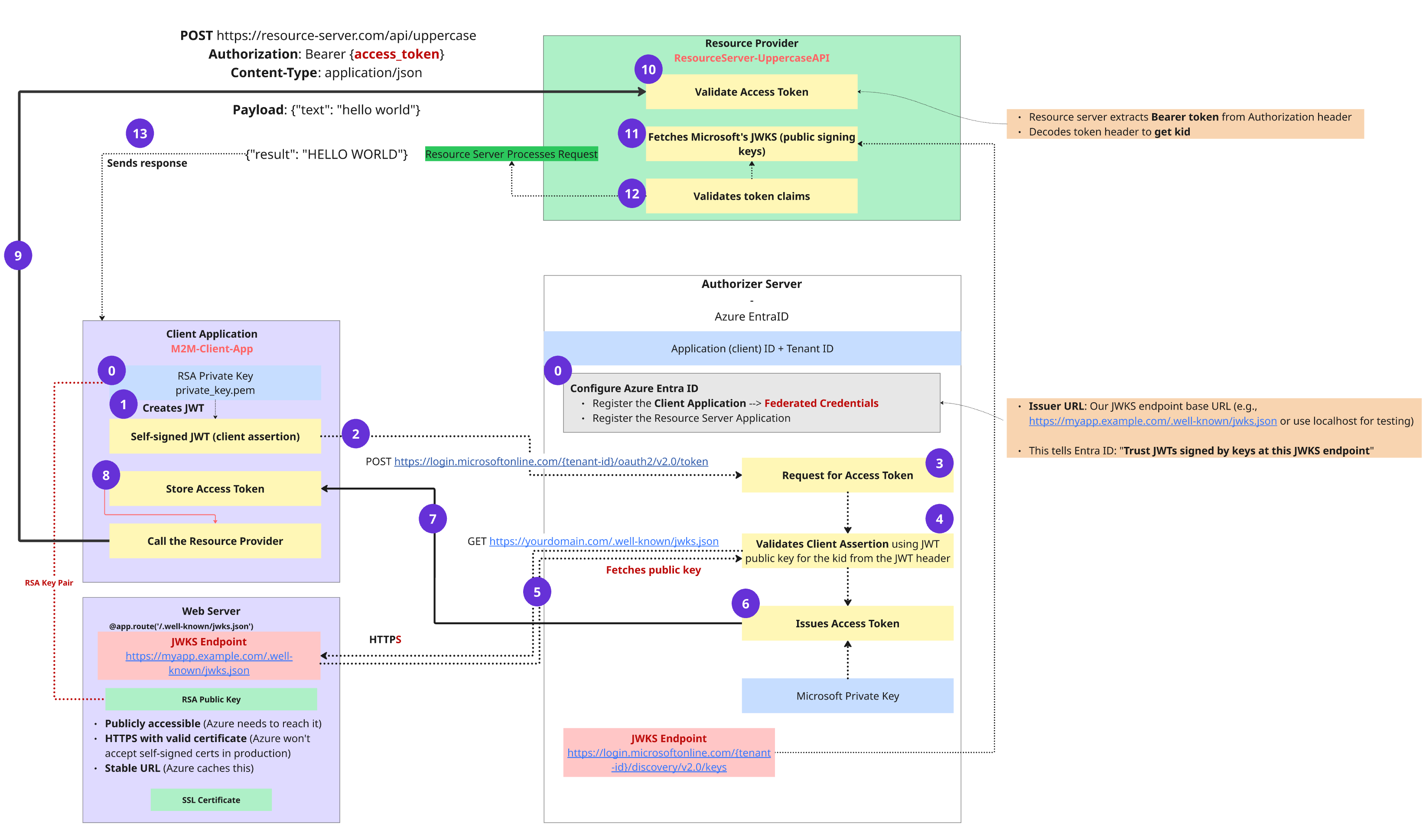
Client Side: Creating the Client Assertion
0. Client has an RSA Key Pair
The machine (our Python client) generates:
private_key.pem → kept locally and secret
public key → exposed through the JWKS endpoint
The private key will sign tokens; the public key will verify them.
1. Client Creates a Self-Signed JWT
The client builds a JWT containing:
iss (issuer) – the client ID
sub (subject) – also the client ID
aud – Azure token endpoint
exp – expiration time
Then it signs the JWT using its private key. This signed JWT is the client assertion.
2. Client Sends the Assertion to Azure Entra ID
The client makes a POST request:
POST https://login.microsoftonline.com/{tenant-id}/oauth2/v2.0/token
Inside the body:
grant_type = client_credentials
client_assertion = signed JWT
client_assertion_type = JWT bearer assertion
scope = resource API scope
This asks Azure for an access token.
Azure Entra ID: Validating the Client Assertion
3. Azure Receives the Client Assertion
Azure inspects the JWT header to find:
alg – signing algorithm
kid – key identifier
Azure uses the kid to decide which public key to fetch.
4. Azure Fetches the JWKS from the Client’s JWKS URI
Azure calls the JWKS URI (e.g., https://myapp.example.com/.well-known/jwks.json) and retrieves the client’s public keys.
This JWKS endpoint must be:
public (Azure must reach it)
served over HTTPS
stable (URL should not change)
5. Azure Selects the Matching Public Key
Azure finds the key whose kid matches the token header.
6. Azure Validates and Issues an Access Token
Azure verifies:
JWT signature matches the public key
claims (iss, exp, aud) are correct
the client is registered
permissions/scopes are allowed
If everything checks out, Azure returns a valid access token signed by Microsoft.
Client Uses the Access Token
7–8. Client Stores the Access Token
The Python app stores it in memory and prepares to call the API.
Client Calls the Resource Server
9. Client Calls the API
The request looks like:
Authorization: Bearer {access_token}
POST https://resource-server.com/api/uppercase
Body: { “text”: “hello world” }
Resource Server Validates the Token
10. Resource Server Extracts and Inspects the Access Token
The API extracts the Bearer token and reads its header to get the kid.
11. API Fetches Microsoft’s JWKS
It retrieves the JWKS from Azure’s public endpoint to get Microsoft’s signing keys.
12. API Validates the Token Claims
The API checks:
signature
issuer
audience (the API’s Application ID URI)
expiration
scope/roles
If valid, the API accepts the request.
13. API Sends Response
The API performs the action—uppercase conversion—and returns:
{ “result”: “HELLO WORLD” }
Summary
Clients authenticate using self-signed JWTs, proving identity with their private key.
Azure Entra ID validates those JWTs using the public keys from the client’s JWKS URI.
Azure issues an access token.
The API validates Azure’s token using Azure’s JWKS.
All communication happens through signed tokens—no shared secrets.
This creates a secure, scalable, cloud-friendly model for machine identity. It’s the right foundation for modern distributed systems and a stepping stone toward dynamic client registration.
✔ No passwords or secrets
No credential sprawl. No vault synchronization. Each client independently manages its own key pair.
✔ Zero trust alignment
Both Azure and the API verify signatures independently.
✔ Safe key rotation
Publish a new public key → rotate private key → everything continues working.
✔ Foundation for dynamic systems
This pattern works beautifully for:
containers that come and go
ephemeral workloads
serverless functions
multi-cloud setups
✔ Cryptographic trust, not configuration trust
Identity is proven mathematically, not administratively.
External resources
👉 https://darutk.medium.com/jwts-in-oauth-oidc-19c8029551d5
👉 https://curity.io/resources/learn/client-assertions-jwks-uri/